 Stay
Android alarm not going off? 7 causes and fixes
If an alarm on Android stays silent or comes late, it is usually one of seven settings: alarm volume, Do Not Disturb, battery optimisation, exact alarms, notifications, full-screen permission – or the phone was off. Check them one by one and then set a test alarm two minutes ahead.
Updated: 21 November 2026
7 causes
- Alarm volume at zero. Android has a separate volume for alarms. Press a volume button, open the volume panel and check the alarm slider.
- Do Not Disturb blocks alarms. Alarms are usually allowed in Do Not Disturb, but this can be switched off. Look in Settings → Sound → Do Not Disturb (names vary by manufacturer).
- Battery optimisation stops the app. Some manufacturers put apps to sleep aggressively. In the app info under Battery, allow unrestricted use.
- No permission for exact alarms. Since Android 12, other apps need the special access “Alarms & reminders” to ring on time. Without it, Android may delay the alarm.
- Notifications switched off. Since Android 13, apps must ask for permission to send notifications; many alarm apps show their alarm through one.
- Full-screen permission missing. On Android 14 and later, an app may need permission to show itself full screen over the lock screen.
- Phone switched off. Most Android phones do not ring when they are switched off.
Test it properly
- Set an alarm for two minutes from now.
- Lock the phone and put it down.
- Wait – do not touch it.
If it rings, the basic setup is fine. If you need the alarm at night, test once with the phone on the charger as you would use it then.
Phones with strict battery saving
Some manufacturers have their own lists of apps that may run in the background or start automatically. If an alarm app keeps being late, look in the battery or app launch settings for an entry for that app and allow it everything.
With the app
Stay Awake checks this for you
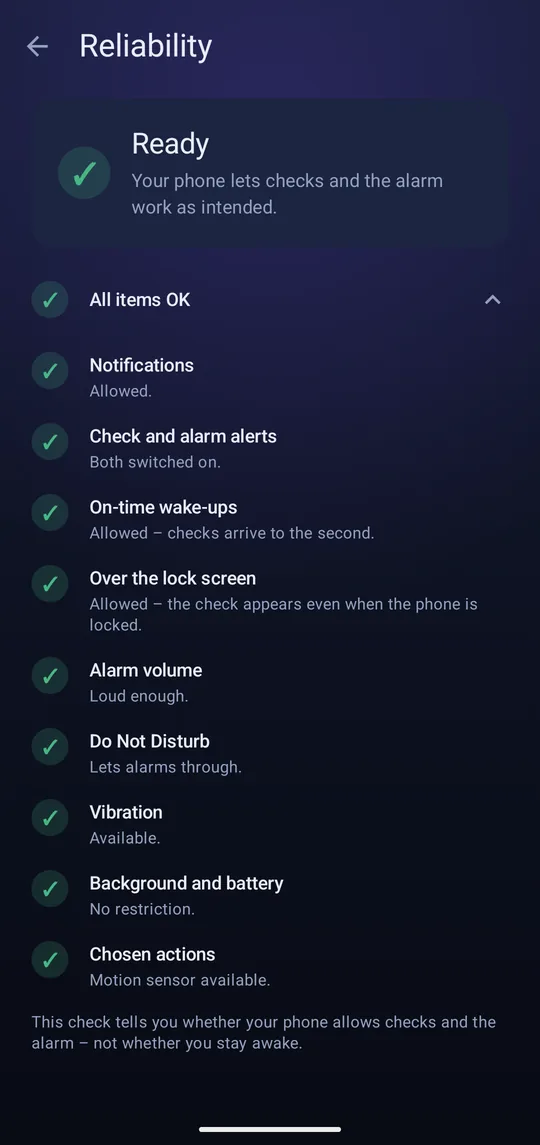
The reliability check in Stay Awake goes through these points – notifications, check and alarm alerts, on-time wake-ups, over the lock screen, alarm volume, Do Not Disturb, vibration, background and battery – and shows how to fix what is not right.
With Test alarm you hear and feel the alarm for five seconds before you rely on it.
Get it on Google PlayFree for Android · no account
Questions and answers
Why does my alarm ring late?
Usually because of battery optimisation or because the app is not allowed to use exact alarms. Android then bundles the alarm with other wake-ups.
Does an alarm ring when the phone is on silent?
On most Android phones alarms ring even in silent mode, as long as the alarm volume is not at zero and Do Not Disturb allows alarms.
Does my alarm ring when the phone is off?
On most Android phones, no. Leave the phone on and charging.