 Stay
For everyone who has to stay awake
An alarm rings once. Stay Awake keeps asking.
You know it: the alarm goes off, you switch it off – and five minutes later you’re asleep again. Stay Awake doesn’t stop after one ring. Every 30 minutes, or at whatever interval you set, it asks: Are you still awake? One shake or one tap and the next round begins. No answer? It vibrates after 10 seconds, and after 20 an alarm rings – until you answer.
Night shifts · standby · study nights · waiting through the night
Get it on Google PlayFree for Android · no account
Why a normal alarm isn’t enough
An alarm is built to wake you up once. Staying awake means getting through hour after hour – and the hard part is the moment nobody checks on you.
A normal alarm
- Rings once – at a time you set in advance.
- Switched off half asleep, and nothing comes after it.
- Never asks whether you’re still awake.
Stay Awake
- Asks again and again, all night – at your interval, from one minute to twelve hours.
- Asks quietly first. Only if you don’t answer does it vibrate, then ring.
- The alarm rings until you answer. Then the next round starts.
What happens when a check is due
Soft first, loud only if needed. Every step stops the moment you answer.
- 0 sThe questionThe screen lights up – over the lock screen too – and asks: Are you still awake?
- 10 sVibrationNo answer yet? The phone starts to vibrate.
- 20 sAlarmStill nothing: a real alarm with your phone’s alarm sound.
- YesNext roundOne tap or one shake: everything stops and the full interval starts again.
Start, confirm, schedule, check
Start
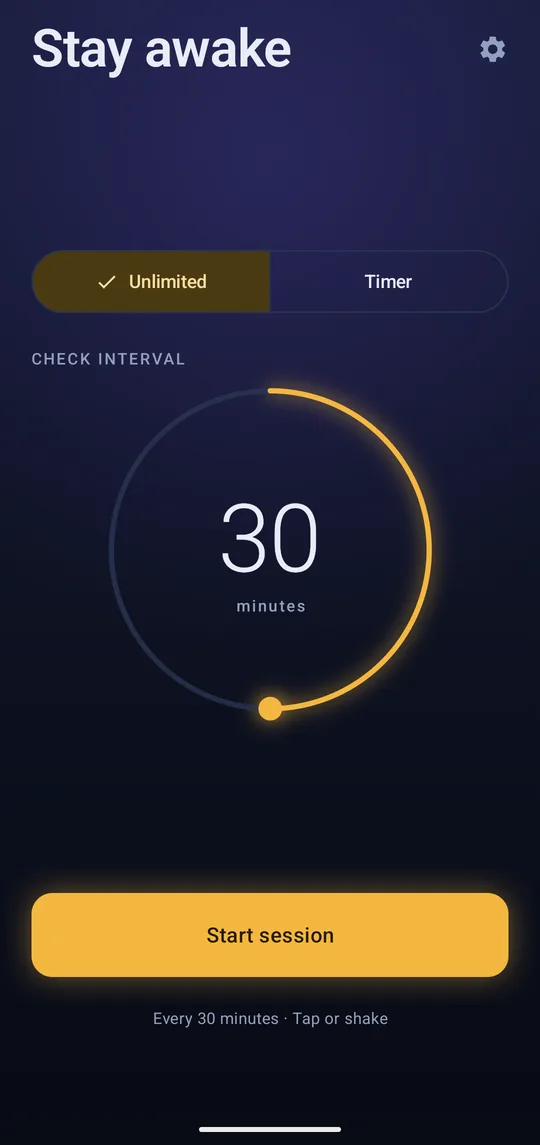
Two decisions, one button
Unlimited or Timer, and how often you want to be asked. Turn the dial – from one minute up to twelve hours, 30 minutes to start with. The app remembers your last choice.
The timer runs for a set time (“for 2 hours”) or until a clock time (“until 5:30”).
Confirm
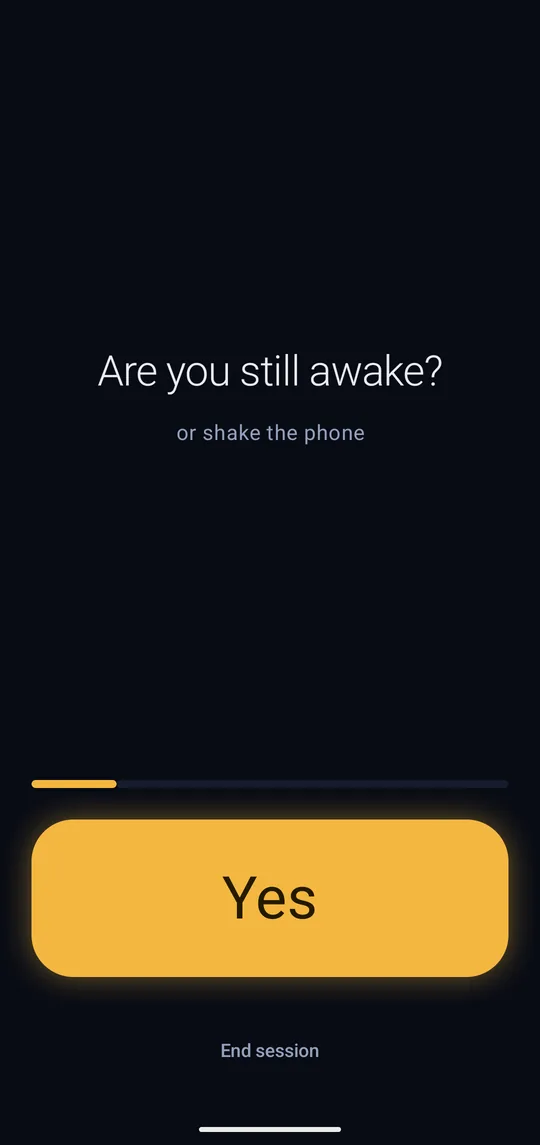
Tap, shake, flip – your choice
The big Yes always works. In Settings you can add shaking the phone, flipping it over once (either way), or a volume button – in any combination. Shake and flip also work with the screen off.
You don’t have to wait for the question: confirm whenever you like, and the interval starts over from that moment. The session notification has an I am awake button too.
Shifts
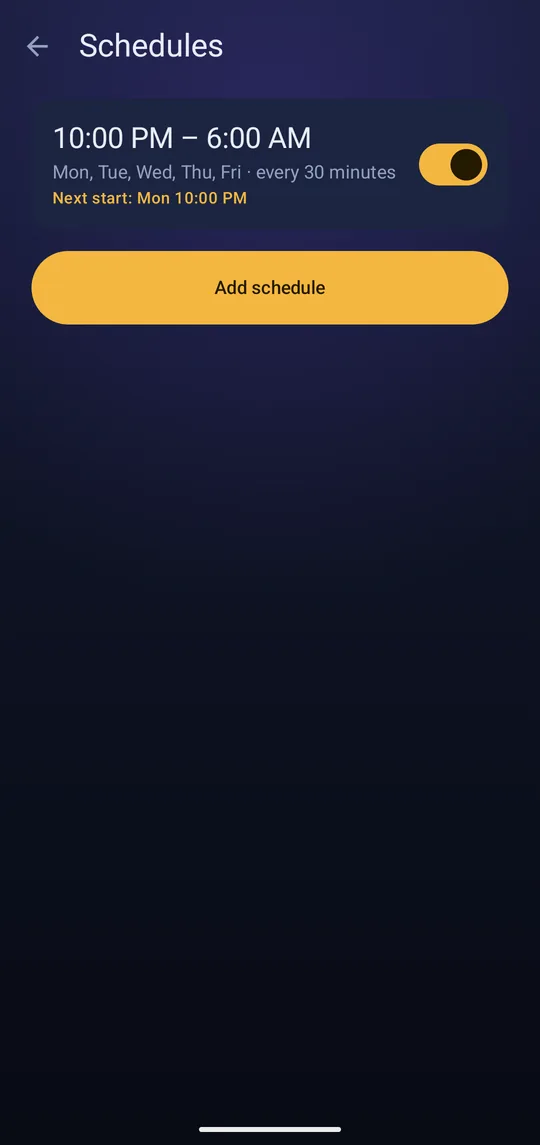
Schedules that start on their own
For nights that repeat: start and end time, optional weekdays, interval. The session starts by itself at the set time and ends at the end time.
Without a weekday it runs once, at the next start.
Reliability
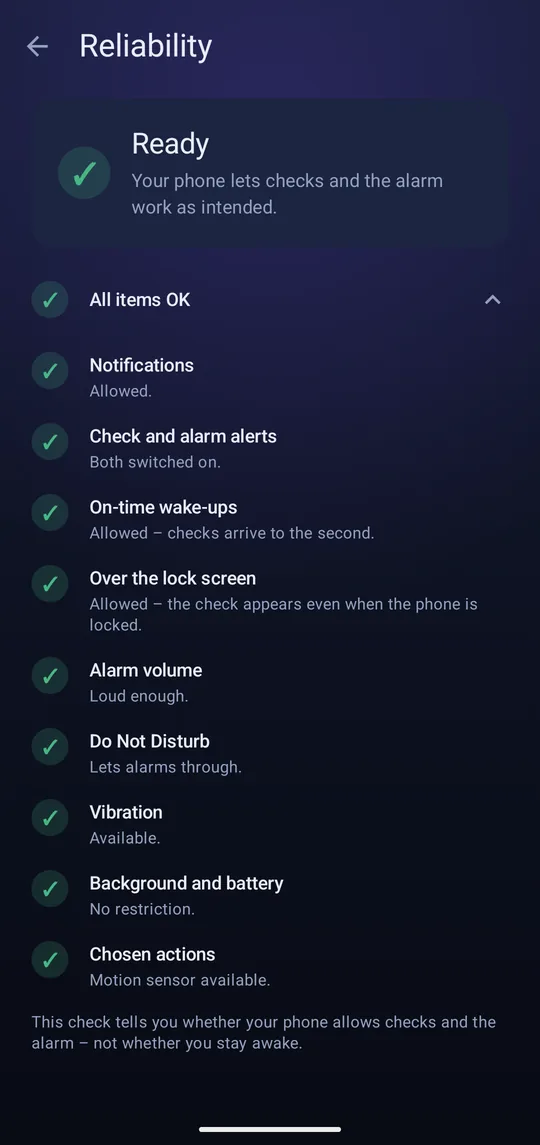
Knows what your phone allows
Android phones can hold back alarms – battery saving, Do Not Disturb, missing permissions. The reliability check goes through every point in plain language and shows how to fix what is not right.
Test alarm lets you hear and feel the alarm for five seconds before the first real night.
Nothing to sign up for
- No account, no login. Sessions, schedules and settings stay on your phone.
- Works offline. Checks and the alarm need no internet connection.
- Sessions survive a restart of the phone.
- Free with a small banner. No ads on the check or the alarm. Stay Awake Pro removes the banner – monthly or as a one-time purchase.
- 20 languages, from Arabic to Vietnamese.
Honest limits
Stay Awake helps you stay awake. It does not replace sleep or breaks, and it is not a safety system for work or driving. Whether a check arrives on time also depends on the phone – the reliability check shows what yours allows.
Guides for long nights
Useful without the app: night shifts, study nights, staying up without coffee, interval alarms.
- How to stay awake on a night shiftLight, movement and a plan for the dead hours around 3 a.m.
- How to stay awake while studying at nightShort blocks, active studying and a timer that checks on you.
- How to stay awake all nightA plan for evening, midnight, the dead hours and the morning.
- How to stay awake without caffeineLight, cold, movement and rhythm instead of coffee.
- How to set an alarm every 30 minutes on AndroidSeveral alarms, a restarted timer or an interval alarm – three ways.
- An alarm that checks if you are still awakeAsk first, get loud only if needed – the idea behind a wake check.
- Android alarm not going off? 7 causes and fixesVolume, Do Not Disturb, battery saving, permissions – what to check.
- Interval alarm on Android: every 10 or 15 minutes, or every hourEvery hour with the clock app, shorter intervals with a timer or an app.
- How to stay awake after your alarm goes offWhy the alarm is not enough, and how to get past the first ten minutes.
Questions and answers
How is this different from a normal alarm clock?
An alarm clock rings at a time, whether you are awake or not. Stay Awake asks first and only gets loud if you do not answer. It is built for staying awake, not for waking up in the morning.
Do I have to keep the screen on?
No. Put the phone down, lock it, let the screen go dark. The check appears over the lock screen. If you chose shaking, a shake confirms even with the screen off.
Which alarm sound does it use?
By default your phone’s own alarm sound – the one you are used to waking up to. In Settings you can switch to the Stay Awake melody or pick another sound.
Does it work without internet?
Yes. Checks, vibration and the alarm run entirely on the phone.
What does it cost?
Everything that keeps you awake is free. The free version shows a small banner on normal screens, never on the check or the alarm. Stay Awake Pro removes it, monthly or once; the price is shown in Google Play.
Is there an iPhone version?
No, Stay Awake is only available for Android.
If you have to stay awake, this is your app.
Start a session, put the phone down. Stay Awake keeps asking until you end the session.
Get it on Google PlayFree for Android · no account