 Stay
Interval alarm on Android: every 10 or 15 minutes, or every hour
An interval alarm (or repeating alarm) rings every few minutes or every hour instead of once at a set time. The clock apps on most Android phones have no setting for that – they repeat by weekday. Which workaround fits depends on the interval: for every hour or longer, a handful of single alarms does the job; for every 10 or 15 minutes you need a timer you restart or an interval alarm app.
Updated: 24 November 2026
Which way fits which interval
Without an app you need one alarm per ring. Counted for eight hours:
| Interval | Alarms for 8 hours | With the clock app alone |
|---|---|---|
| 10 minutes | 48 | Too many – timer or app |
| 15 minutes | 32 | Too many – timer or app |
| 20 minutes | 24 | Too many – timer or app |
| 30 minutes | 16 | Possible, but tedious |
| Every hour | 8 | Works well |
| Every 2 hours | 4 | Works well |
For exactly 30 minutes there is a separate step-by-step guide: alarm every 30 minutes on Android.
How to set an alarm every hour
- Open the clock app and go to Alarm.
- Add an alarm for the first hour you need, for example 10 p.m.
- Add one more for each following hour – 11 p.m., midnight and so on.
- If it should come back on certain days, pick the same weekdays for all of them.
- Give them a label such as “hourly”, if your clock app offers labels – that makes them easier to find later.
Two things to know: the alarms ring at fixed times whether you are awake or not, and afterwards you switch them off again one by one.
Many digital watches and some smartwatches have an hourly chime – a short beep on the hour. That is a time signal, not an alarm: it does not wait for a reaction.
An alarm every 10 or 15 minutes
At these intervals single alarms are out – 32 or 48 of them for one night. That leaves two ways:
- Restart a timer. Set the clock app’s timer to 10:00 or 15:00 and start it again each time it rings. Enough for an hour or two while you are busy anyway; miss one restart and the series is over.
- An interval alarm app. It repeats by itself. What to look for is further down.
Is snooze an interval alarm?
Snooze repeats an alarm after a few minutes. On some phones you can set the snooze interval and the number of repeats – on Samsung phones, for example, right in each alarm. It still is not an interval alarm: snooze belongs to one single alarm and is meant for getting up. As soon as you dismiss the alarm, the series is over.
Reminder, interval timer or interval alarm?
| Repeating reminder | Interval timer | Interval alarm | |
|---|---|---|---|
| Signal | Notification, often with a short sound | Sound at the end of each round | Rings like an alarm |
| Locked screen | Shows as a notification | Depends on the app | Should show over the lock screen |
| Next round | At fixed times | Right away, by itself | By itself – at fixed times or from your reaction, depending on the app |
| Typical use | Drink water, stretch | Workouts, focus blocks | Recurring things you don’t want to miss |
If missing a ring would matter, pick an alarm, not a reminder: a notification is easy to overlook. And if the point is to stay awake, there is a fourth kind – a wake check, which asks first and only rings when no answer comes: an alarm that checks if you are still awake.
What to look for in an interval alarm app
- Can you set any interval – or only fixed steps such as 15, 30 and 60 minutes?
- Does the next interval start at fixed times or from your reaction? From your reaction means you get the full time again after every ring.
- Does it end by itself – after a set duration, at a clock time or by schedule – so it doesn’t ring on into the next day?
- Does it still ring with the screen off and the phone locked? That takes exact alarms and the right permissions; how to check them is in Android alarm not going off.
With the app
Stay Awake: any interval from 1 minute to 12 hours
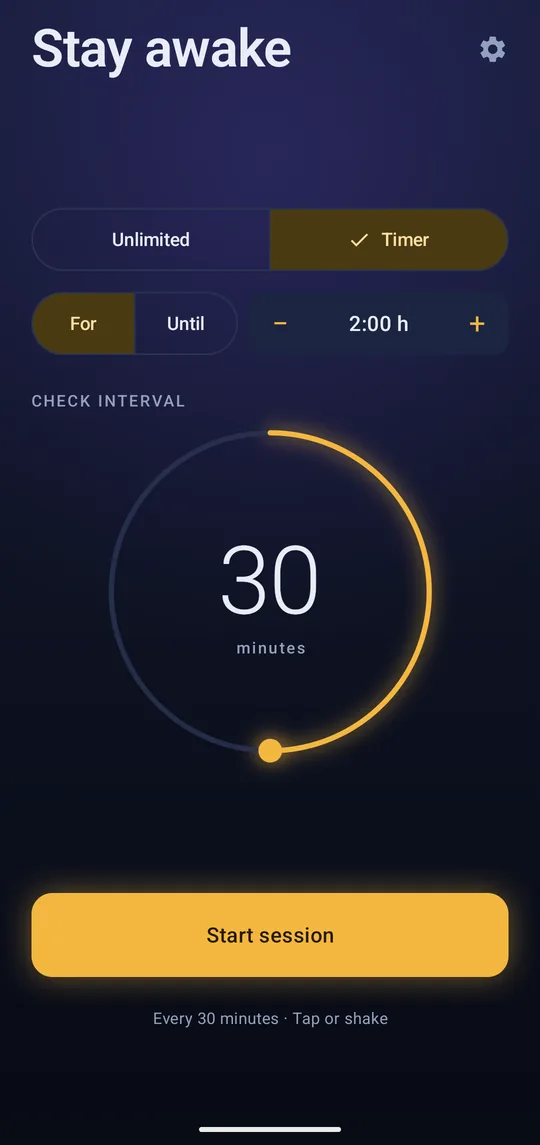
Stay Awake is an interval app made for staying awake. You set the interval with a dial – any value from one minute to twelve hours – and it uses exact alarms. It does not ring straight away: each round starts with a quiet question on the screen, “Are you still awake?”. One tap and the next interval starts from that moment. No answer: vibration after 10 seconds, alarm after 20.
Three ways to run it: Unlimited until you end it, as a Timer for a set time (“for 2 hours”) or until a clock time (“until 6:00”), or as a schedule that starts by itself on the weekdays you choose.
If all you want is a short beep every hour that needs no answer, a reminder app or an hourly chime is the better fit.
Get it on Google PlayFree for Android · no account
Questions and answers
Can Android set an alarm every hour?
Not with a single alarm: the clock apps on most Android phones repeat by weekday only. Create one alarm per hour – eight for an eight-hour night – or use an interval alarm app.
How do I set an alarm every 10 or 15 minutes on Android?
Single alarms make no sense at that pace (32 to 48 for eight hours). Restart the clock app’s timer each time it rings, or use an interval alarm app that repeats by itself.
Is snooze the same as an interval alarm?
No. Snooze repeats one single alarm for a while and ends as soon as you dismiss it. An interval alarm keeps its rhythm until the end you set.
Which interval makes sense for staying awake?
That depends on how quickly you drift off. Stay Awake starts with 30 minutes; if that feels too long, go shorter. Any value from one minute to twelve hours works.